
Photo transformation guide
Image to Image AI Generator: Turn a Selfie Into a Stadium Photo
Learn how an image to image AI generator uses your photo as a visual reference, what makes a stadium transformation believable, and how YouThere turns one clear selfie into a shareable football fan-cam moment.
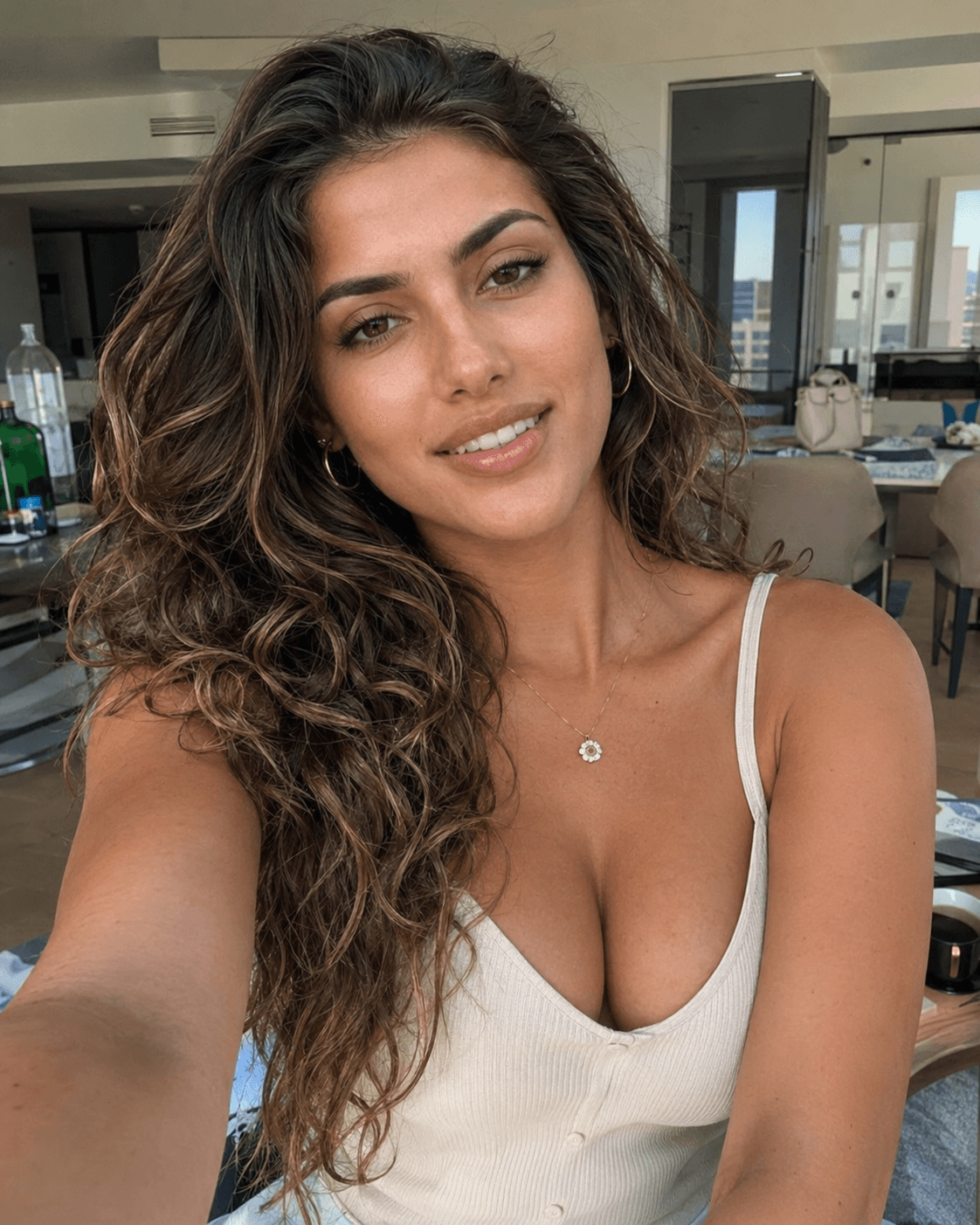
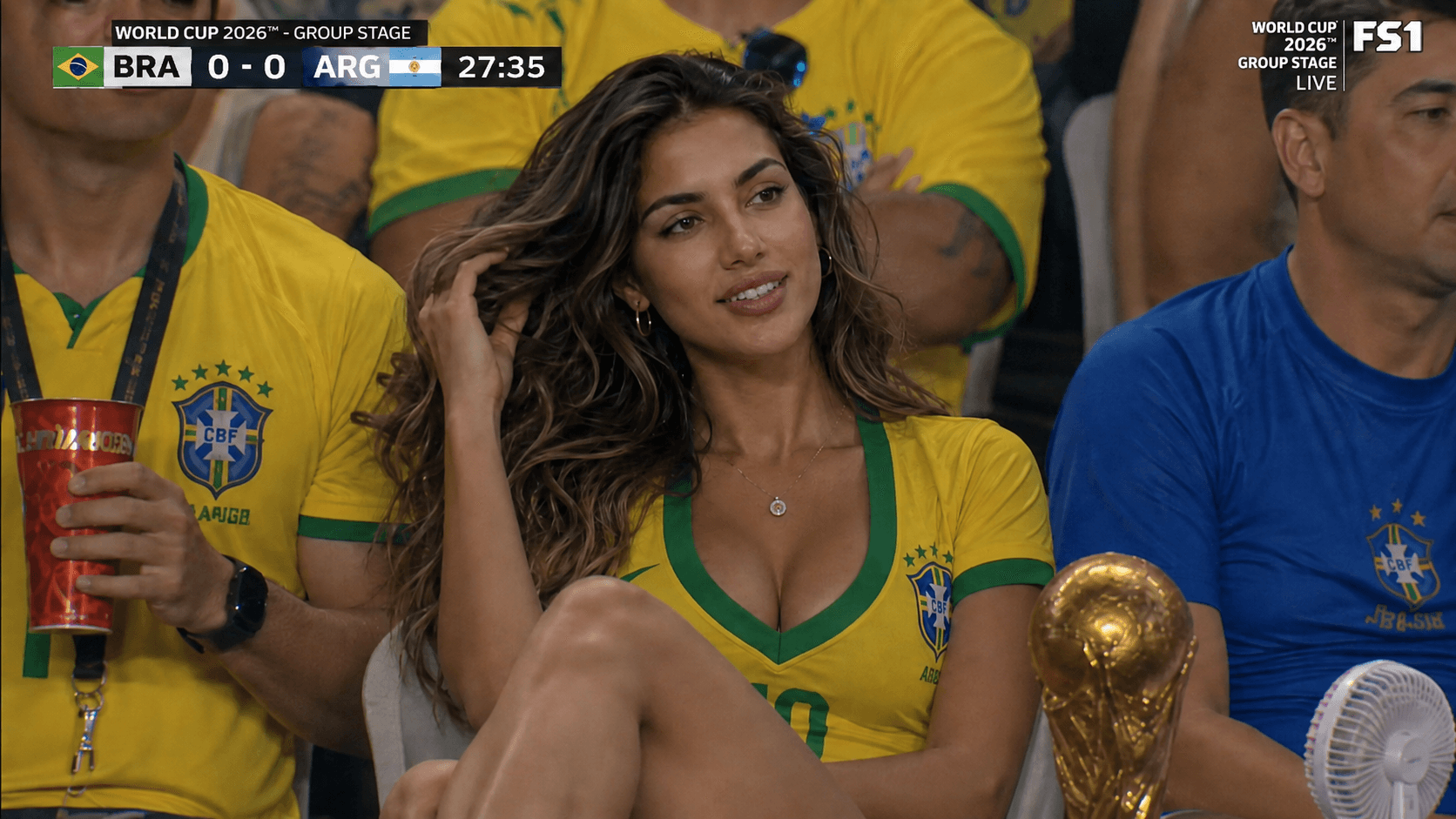
Quick answer
What is an image to image AI generator?
An image to image AI generator transforms an existing picture into a new scene while using the source image as a reference. Instead of creating a person from text alone, it can preserve recognizable facial features, then change clothing, lighting, camera angle, background, and atmosphere. YouThere applies that workflow to one focused result: a realistic, unofficial football stadium fan photo made from a permitted selfie.
- 01
Upload a clear portrait
Choose one front-facing adult portrait that you own or have permission to use, with the face visible and natural lighting.
- 02
Choose a stadium scene
Pick the football crowd setting and country-color styling that fit the matchday moment you want to create.
- 03
Generate and review
Create the image, then check the face, hands, clothing details, crowd, lighting, and disclosure before downloading or sharing.
Why start from a photo instead of a text prompt?
Text-to-image tools are useful when the subject can be invented. They are less reliable when the subject must still look like you. A text prompt can describe age, hair, expression, and clothing, but it cannot capture the exact relationship between your eyes, nose, jawline, skin texture, and smile. A source photo supplies that visual information directly.
That is the practical advantage of an image to image AI generator. Your picture becomes the identity reference while the model rebuilds the surrounding scene. The output is not a simple background replacement. A convincing transformation has to reconcile the face with new stadium lighting, a different lens, changed clothing, nearby supporters, and a believable seated pose. When those elements agree, the result feels like one photograph rather than a portrait pasted onto a crowd.
YouThere narrows the task further. It is not presented as an unrestricted editor for every art style. It is a guided football photo experience for people who want to appear in a realistic crowd-camera moment without learning model settings or writing a long prompt.
How the image-to-image workflow changes your selfie
A useful workflow separates what should remain recognizable from what should change. The face, broad appearance, and human identity need continuity. The background, outfit, crop, light, and matchday energy can be rebuilt. This balance is why the source image matters as much as the written direction.
The image to image AI generator first reads visual features from the uploaded portrait. It then composes those features inside a new scene guided by product choices such as a stadium crowd, country colors, and a broadcast-style camera. The strongest result does not preserve every pixel. It preserves the person while allowing enough change for the new environment to look coherent.
For a stadium photo, coherence means several small details working together: overhead floodlights should shape the face; the camera angle should match the seating position; clothing should follow the body; background supporters should have realistic scale; and the depth of field should resemble a long-lens crowd shot. This is closer to directing a new photograph than applying a filter.
Three steps to create a realistic stadium fan photo
- Upload one clear adult portrait. Use a photo you own or have permission to use. A forward-facing image with an unobstructed face gives the image to image AI generator a cleaner reference than a distant group shot, heavy beauty filter, dark silhouette, or profile view.
- Choose a stadium scene and country-color treatment. Generic supporter colors, scarves, face paint, and crowd energy communicate football identity without copying official team badges, tournament logos, sponsor marks, trophies, or broadcaster graphics.
- Generate, inspect, and share responsibly. Check facial likeness, hands, teeth, shirt details, nearby faces, and lighting. Keep the strongest version, disclose that it is AI-generated where appropriate, and never present the result as proof that you attended a real match or appeared on television.
YouThere keeps the creation path short because the visible decisions should match the goal. You choose the person and the matchday look; the product handles the football-specific visual direction behind the scenes.
What makes an AI football photo look realistic?
Realism is not the same as polish. Stadium broadcasts contain mixed light, crowd clutter, partial faces, motion, compression, imperfect framing, and the visual flattening of a telephoto lens. A glossy poster with perfect studio light may be attractive, but it rarely reads as a spontaneous crowd-camera capture.
A well-directed image to image AI generator should therefore preserve a little photographic imperfection. Natural skin texture, a candid expression, believable shadows, background depth, and nearby fans looking in different directions all help. The subject should belong to the environment rather than dominate it like a commercial model.
- Identity: the face remains recognizable without looking waxy or over-smoothed.
- Camera: the crop and perspective resemble a broadcast crowd shot, not a studio portrait.
- Light: stadium floodlights affect the person, clothing, and nearby seats consistently.
- Crowd: background people vary naturally in pose, focus, scale, and attention.
- Wardrobe: country colors feel festive while avoiding official marks and protected branding.
- Artifacts: hands, teeth, text-like shapes, earrings, and shirt edges survive a close review.
Choose the right source image
The source photo sets the ceiling for identity quality. More pixels alone do not guarantee a better result; clarity and visibility matter more. Choose a recent portrait with one adult subject, a visible face, normal proportions, and even light. Leave some space around the head and shoulders so the model can adapt the framing.
Avoid sunglasses, face-covering accessories, strong colored filters, extreme wide-angle distortion, very low resolution, and hard shadows across the eyes. Group photos introduce ambiguity about who should appear. Full-body images taken from far away provide too little facial detail. If the first output does not resemble you, improving the source image is often more effective than repeating the same generation.
An image to image AI generator can reconstruct a new environment, but it should not be expected to recover identity details that the original photo never showed. A clean reference reduces guesswork and gives the model more freedom to solve the stadium scene.
Privacy, consent, and honest sharing
Only upload your own image or a photo you have clear permission to use. Do not upload minors, strangers, public figures, athletes, former partners, or anyone who has not consented. A realistic result can be playful, but realism increases the responsibility to label and contextualize it honestly.
YouThere is designed for unofficial fan-made scenes. The image to image AI generator should not be used to impersonate someone, fabricate evidence, mislead viewers about attendance, or suggest endorsement by a tournament, team, venue, sponsor, or broadcaster. Avoid official logos, team crests, sponsor marks, trophy replicas, venue branding, broadcast overlays, and real player likenesses.
Before posting, consider the platform and audience. A short caption such as ‘AI matchday version’ preserves the joke without turning the image into a deceptive claim. If a platform offers an AI-content label, use it when required. The most shareable result is one that starts conversation without creating confusion about what actually happened.
Frequently asked questions
Is YouThere a free image to image AI generator?
YouThere lets eligible users try the stadium photo flow and preview the result. Free exports may include a watermark, while clean originals and plan limits depend on the current pricing shown in the product. The experience is specialized for football fan photos rather than unrestricted image editing.
Will the generated stadium photo still look like me?
The image to image AI generator is designed to preserve recognizable identity from a clear permitted portrait, but every AI generation can vary. Use a front-facing photo with visible features, then review the face carefully before sharing. If likeness is weak, try a clearer source image instead of repeatedly using the same difficult reference.
Do I need to write a prompt?
No. YouThere provides a guided image to image AI generator for stadium fan-cam scenes. You upload the portrait and choose the visible matchday options; the product supplies the scene direction and exclusions needed for the transformation.
Can I use another person's photo?
Only when that adult has clearly given you permission. An image to image AI generator should not be used with photos of minors, strangers, celebrities, athletes, or anyone who has not consented. Never use a result to impersonate, embarrass, defraud, or mislead someone.
Can I make an official World Cup or team image?
No. YouThere creates unofficial fan-made scenes and is not affiliated with FIFA, any tournament, team, league, venue, federation, sponsor, or broadcaster. Use generic country colors and supporter styling, not official logos, badges, trophies, sponsor marks, venue branding, or broadcast graphics.
Turn your photo into a stadium moment
Use the YouThere image to image AI generator to upload one permitted portrait, choose a football crowd scene, and create an unofficial fan-made image ready for review and sharing.
Related guides
Safe by design: Unofficial fan-made image generator. Not affiliated with FIFA, any tournament, team, league, venue, federation, sponsor, or broadcaster.